Friday, January 24, 2014
Friday, January 10, 2014
Removing Elan's PSeries Drivers from The Windows Installations
Removing Elan's PSeries Drivers from The Windows Installations #PCMCIA #PC_Card #hardware http://t.co/Ohv9dhTZy3 pic.twitter.com/MOnZ6pWicb
— Synchrotech, Inc. (@synchrotech_inc) January 10, 2014
Typically manufacturers provide a mechanism for removing drivers from the system. Elan, however, never wrote an uninstall routine. They did provide instructions for manually removing the drivers in the readme.txt file on the PSeries installation CD-ROM. Those instructions are reproduced here. These 5.07.07 release notes are for operating systems that PSeries readers were approved to run on. If you have inadvertently installed the PSeries drivers on systems newer than The Windows Server 2003 (eg. The Vista, 7, 8, etc.), you may have to account for changes in these procedures based on changes to The Windows. This applies to systems that had existing PSeries drives installed and were upgraded to systems newer than The Windows Server 2003.
In the case that these instructions don't work, or that changes in later Windows systems render these instructions entirely obsolete, the best course of action to permanently remove PSeries drivers is to back up all your data, reformat your system disk, and reinstall The Windows from scratch as per the instruction come from Microsoft when you purchase your copy of Windows. This assures that the PSeries drivers are entirely removed from a system.
----------oOo----------
************************************************
6 Uninstalling the PSeries drivers
************************************************
The PSeries drivers are fully plug and play in that they
will detect the PCMCIA hardware will no load if the
PCMCIA hardware is not present in the PC. Usually it is
not necessary and not recommended to completely
uninstall the PSeries drivers. If the drivers are to be
completely removed, the following sections explain how to
remove the drivers for the particular operating system.
DON'T FORGET!!! THE PCMCIA HARDWARE WILL
FAIL TO OPERATE CORRECTLY WITHOUT THE
PSERIES DRIVERS INSTALLED!
6.1 Uninstalling the PSeries drivers in Windows 9x/Me
==================================================
To uninstall the PSeries drivers, go to the "Control Panel",
run "Add/Remove Programs", select the PSeries Drivers
and click "Change/Remove".
Re-boot the computer into "Safe Mode" (by pressing "F8"
during boot). Double click the "System" icon in the control panel,
select "Device Manager" and expand the "PCMCIA socket" entry
highlight each entry for the PCMCIA socket and click "Remove".
From Windows Explorer delete the files:
c:\windows\inf\pseries.inf
c:\windows\inf\pseries.pnf
c:\windows\system\pseries.vxd
From Windows Explorer, go to the c:\windows\system\oldpcmcia
folder and move the "PCMCIA.INF" file to the c:\windows\inf folder.
Run the registry editor (regedit.exe) an delete the key:
"HKEY_LOCAL_MACHINE\SYSTEM\CurrentControlSet
\Services\VxD\PSeries"
Shut down the PC and remove the PC-Card adapter hardware.
Re-boot the PC and the driver is no longer installed.
----------oOo----------
6.2 Uninstalling the PSeries drivers in Windows NT
==================================================
To uninstall the PSeries drivers:
1) Shut down the PC and remove the PC-Card adapter hardware.
2) re-boot the PC and go to the "Control Panel", run
"Add/Remove Programs", select the PSeries Drivers and
click "Change/Remove".
3) Run the registry editor (regedit.exe) an delete the key:
"HKEY_LOCAL_MACHINE\SYSTEM\CurrentControlSet\Services\PSeries"
4) From Windows Explorer delete the file:
c:\winnt\system32\drivers\pseries.sys
The PSeries driver is now no longer installed.
----------oOo----------
6.3 Uninstalling the PSeries drivers in Windows 2000/XP & Server 2003
=====================================================================
Version 5.06 of the PSeries driver introduced more integrated
operation with the Windows 2000 driver model. So there
are differences in the way previous and later releases
are uninstalled.
----------------------------------------------------------
To uninstall the PSeries 5.05 and earlier release drivers:
----------------------------------------------------------
1) Shut down the PC and remove the PC-Card adapter hardware.
2) re-boot the PC and go to the "Control Panel", run
"Add/Remove Programs", select the PSeries Drivers and
click "Change/Remove".
3) Run the registry editor (regedit.exe) an delete the key:
"HKEY_LOCAL_MACHINE\SYSTEM\CurrentControlSet\Services\PSeries"
4) From Windows Explorer delete the file:
c:\winnt\system32\drivers\pseries.sys
The PSeries driver is now no longer installed.
-------------------------------------------------
To uninstall the PSeries 5.06 to 5.07.02 drivers:
-------------------------------------------------
1) go to the "Control Panel", run "Add/Remove Programs",
select the PSeries Drivers and click "Change/Remove".
2) From Windows Explorer delete the file:
c:\winnt\inf\pcmcia.inf
then rename the c:\winnt\inf\pcmcia.old file to
c:\winnt\inf\pcmcia.inf
To successfully remove all traces of the PSeries driver, you
must NOT remove the PCMCIA adapter hardware from the PCI slot
until you have performed the following step. IF you have
moved the adapter from another PCI slot at any time, then
you will need to re-do this step with the hardware in
every slot that was previously used. (Windows 2000 preserves
the setup independently for each PCI slot in the PC).
3) Open the "Device Manager" and expand the "PCMCIA socket"
entry, highlight each entry for the PCMCIA socket,
right-click and select "Uninstall...".
Finally, when you have completed the above step for each PCI
slot the PCMCIA adapter has been in, you can do the
following steps...
4) Run the registry editor (regedit.exe) an delete the key:
"HKEY_LOCAL_MACHINE\SYSTEM\CurrentControlSet\Services\PSeries"
5) From Windows Explorer delete the file:
c:\winnt\system32\drivers\pseries.sys
6) Shut down the PC and remove the PC-Card adapter hardware.
When you Re-boot the PC and the driver is no longer installed.
----------oOo----------
-----------------------------------------------------
To uninstall the PSeries 5.07.03 (and later) drivers:
-----------------------------------------------------
1) go to the "Control Panel", run "Add/Remove Programs",
select the PSeries Drivers and click "Change/Remove".
2) From Windows Explorer delete the file:
c:\winnt\inf\pseries.inf
then rename the c:\winnt\inf\pcmcia.old file to
c:\winnt\inf\pcmcia.inf
To successfully remove all traces of the PSeries driver, you
must NOT remove the PCMCIA adapter hardware from the PCI slot
until you have performed the following step. IF you have
moved the adapter from another PCI slot at any time, then
you will need to re-do this step with the hardware in
every slot that was previously used. (Windows 2000/XP preserves
the setup independently for each PCI slot in the PC).
3) Open the "Device Manager" and expand the "PCMCIA socket"
entry, highlight each entry for the PCMCIA socket,
right-click and select "Uninstall...".
4) Finally, when you have completed the above step for each PCI
slot the PCMCIA adapter has been in, you can shut down the
PC and remove the PC-Card adapter hardware.
When you Re-boot the PC and the driver is no longer installed.
----------oOo----------
Friday, December 20, 2013
Newnex FireNEX-5000 SuperSpeed USB 3.0 Optical Repeater
Shoring up one of USB 3.0's most glaring shortcomings, Newnex's FireNEX-5000 extends SuperSpeed USB 3.0 transmission runs to over 100 meters! Among the world's first USB 3.0 optical repeaters, the FireNEX-5000 uses industry standard LC connector optical cables to extend far beyond the practical length limit for copper USB 3.0 cable of 3 meters. This capability opens many possibilities for the use of USB 3.0 in Machine Vision, security and scientific fields. The FireNEX-5000 set includes one FireNEX-5000 device unit (upstream) and one FireNEX-5000 host unit (downstream), a user's manual and a single FIRENEX-5POWER 5V power supply. A single FIRENEX-5POWER is included to power the device end which requires an external power source. The host unit may be bus powered by the computer; if power cannot be provided by the computer then a second power supply such as the FIRENEX-5POWER will need to be purchased. Optical cable and USB 3.0 cables are not included.
Important Note: This device is not backwards compatible. It does not support older USB2.0/1.1 devices, it will work only with USB 3.0 devices.
Posted by
Synchrotech
at
15:20
0
comments
Labels: FIber Optics, Optical Repeater, SuperSpeed USB, tech, Technology, USB 3.0
Wednesday, December 4, 2013
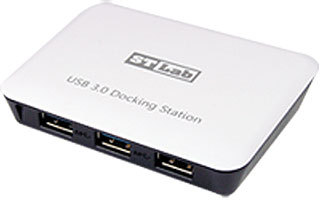
SuperSpeed USB 3.0 Hub 3 Port plus Gigabit Ethernet Docking Station U-810
Posted by
Synchrotech
at
10:13
0
comments
Labels: Adapter, ethernet, gigabit ethernet, GigE, SuperSpeed USB, Synchrotech, tech, Technology, USB 3.0
Superior design of Apple's Lightning connectors inspires upcoming Type-C USB standard
It's no secret that the bulky and awkward design of 'Micro' USB connectors has long been problematic especially its unidirectional orientation insertion requirement. While not nearly as elegant as Apple's Lightning connectors, the new USB Type-C connectors promise better than the downright awful existing standard. According to the USB-IF press release:
Key characteristics of the USB Type-C connector and cable solution include:
- An entirely new design tailored to work well with emerging product designs
- New smaller size similar in size to the existing USB 2.0 Micro-B
- Usability enhancements users will no longer need to be concerned with plug orientation/cable direction, making it easier to plug in
- The Type-C connector and cable will support scalable power charging
- Scalability the connector design will scale for future USB bus performance
Several trade publications have covered this story.
The Next-Gen USB Plug To Be Smaller And Finally Reversible
Key characteristics of the USB Type-C connector and cable solution include
Posted by
Synchrotech
at
10:07
0
comments
Labels: tech, Technology, USB, USB 3.1, USB Type-C
Friday, November 15, 2013
New: Portable Bluetooth Mono Speaker M-520
Portable Bluetooth Mono Speaker M-520 http://t.co/gkjGi5CMsz pic.twitter.com/OAwSC4UXnP
— Synchrotech, Inc. (@synchrotech_inc) November 15, 2013
The Portable Bluetooth Mono Speaker M-520 allows wireless playback of streaming music from a range of wireless devices. Play songs from an iPad, Android or other Smart Phone, iPhone, notebook computer or any other device with A2DP Bluetooth transmitting capability to remote speakers up to 10 meters away. The M-520 can also act as a standard speaker for devices without wireless capabilities by using the included cable to plug into the 3.5mm audio inputs on an output device. The Portable Bluetooth Mono Speaker M-520 can utilize one of three power options, AC adapter, USB bus power, or its own internal rechargeable battery for maximum portability.
Posted by
Synchrotech
at
13:33
0
comments
Wednesday, November 13, 2013
PCI Express to Parallel (IEEE 1284) I/O 2 Port Host Adapter
PCI Express to Parallel (IEEE 1284) I/O 2 Port Host Adapter http://t.co/EZjdwKjs3o pic.twitter.com/BW9kZN2xq0
— Synchrotech, Inc. (@synchrotech_inc) November 13, 2013
Posted by
Synchrotech
at
12:10
0
comments
Labels: Host Adapter, IEEE 1284, LPT, Parallel Port, PCIe, Synchrotech, tech, Technology
Thursday, November 7, 2013
Our top selling item September and October: Orico 4-Port Wall AC USB Charger for Mobile Phones and Tablets DCH-4U
Our top selling item: Orico 4-Port Wall AC USB Charger for Mobile Phones and Tablets DCH-4U http://t.co/XOoctDXj5I pic.twitter.com/a3Y5M70IHf
— Synchrotech, Inc. (@synchrotech_inc) November 7, 2013
Perfect for travelers or anyone looking to charge multiple portable devices at once, the Orico 4-Port Wall AC USB Charger for Mobile Phones and Tablets DCH-4U delivers economical performance. The charger provides up to a total of 6 Amperes of power (30W). The DCH-4U features two high-current capacity 5V/2A and two standard 5V/1A power ports. DCH-4U s port versatility allows it to charge four portable devices at once, including two high current draw devices, like iPads. Boasting sophisticated circuit design, the DCH-4U provides over-heating, over-current, and over-charging protection. Charging automatically stops when batteries are full.
The Orico 4-Port Wall AC USB Charger for Mobile Phones and Tablets DCH-4U is compatible with iPhone, iPad, HTC phones, Samsung Galaxy Tab, Samsung Galaxy Phone, Samsung Galaxy Note, Blackberry, MP3 players, Digital Camera, and other USB devices. The four Type-A Female downstream ports are power only. The DCH-4U allows use of existing USB charging cables to charge most USB powered devices. An easy-to-see LED confirms whether USB charger is properly connected.
Monday, November 4, 2013
CryptoMate64 USB Portable Cryptographic Token
CryptoMate64 is a lightweight USB token that provides a strong authentication solution. With a weight of only 6g, it is the most secure and portable cryptographic USB token in the market. CryptoMate64 enables digital signatures, email encryption, online payments, Windows log-on and other Public Key Infrastructure (PKI) applications. With the help of a smart card mini-driver that is automatically downloaded once the device is plugged into the PC, the Cryptomate 64 can easily be used for secure and efficient operations in Windows environments.
Cryptomate64 has a built-in ACOS5-64 Smart Card chip where all cryptographic operations, such as RSA (up to 4096bits), SHA-1, SHA-256, AES-128/192/256 and 3K 3DES, are performed, rather than in the PC or terminal, This ensures that all sensitive credentials protected by cryptographic keys cannot be hacked or sniffed. This allows ultimate security to be achieved.
Posted by
Synchrotech
at
14:32
0
comments
Labels: ACS, cryptography, multi-factor authentication, Smart Card, tech, Technology, USB
Thursday, October 24, 2013
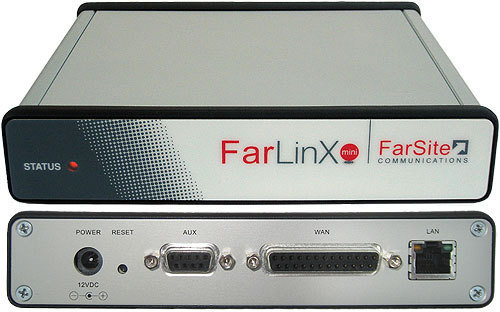
FarLinX X.25 to XOT and X.25 to TCP/IP Mini Gateway
The FarLinX Mini Gateway is the smallest member of the FarLinX Gateway range - it can handle your smaller scale single X.25 line to TCP/IP migration requirements. It offers many of the same features as in the larger FarLinX X25 Gateway range but at a lower price and in a more compact enclosure. The Gateway supports XOT to X.25 switching, X.25 to TCP data translation and connection routing, TCP to XOT, a Triple-X PAD, and a Host PAD. All this is easily managed from your browser. There are also daily activity logs with a selectable level of detail, automatically archived on a daily basis. The SNMP support provides alerts for a numerous different conditions including critical events such as line down and line up. The more powerful FarLinX X25 Gateway range is more suitable where multiple and faster X.25 lines are used.
Thursday, October 17, 2013
G-Tech G-RAID with Thunderbolt at Synchrotech
G-RAID with Thunderbolt, designed specifically for professional content creation applications, features the most powerful, flexible I/O technology ever. At double the data transfer rates of USB 3.0 and over 12 times faster than Firewire 800, no other PC I/O interface can match the raw speed of Thunderbolt now available in G-Technology’s leading RAID solution. The G-Technology team has built its reputation and business on serving creative professionals and prosumers that demand performance, capacity and quality. To continue its tradition of serving this market, we’ve worked with Intel and Apple to enable Thunderbolt on its product line. Leveraging the strengths of our Enterprise storage experience, our AV expertise and the capabilities of Thunderbolt, the G-Technology team is delivering the future of rich media now.G-RAID is ready right out of the box for use with Mac OS X systems and appears to the system as a single, big and fast disk drive. G-RAID also supports Windows(R) systems with a simple reformat. G-RAID is backed by a standard 3-year factory warranty and unlimited free technical support by representatives experienced with the latest content creation applications.
Posted by
Synchrotech
at
16:01
0
comments
Labels: HDD, RAID, Technology, Thunderbolt
Friday, October 11, 2013
Apotop All-in-1 USB 2.0 Memory Card Reader/Writers DR85 and DR87 Benchmarks
Apotop All-in-1 #USB 2.0 Memory Card Reader/Writers DR85 and DR87 Benchmarks http://t.co/dIjjagOYQ6 pic.twitter.com/ORd9YBzsqs
— Synchrotech, Inc. (@synchrotech_inc) October 11, 2013
Posted by
Synchrotech
at
15:18
0
comments
Labels: benchmarks, media reader, Memory Cards, USB, USB 2.0
Tuesday, September 24, 2013
Apotop All-in-1 SuperSpeed USB 3.0 Memory Card Reader/Writer
Benchmarks
Apotop 3R01-B USB 3.0 All in 1 SuperSpeed Card Reader with ATP ProMax CompactFlash 300X UDMA 16GB
Apotop 3R01-B USB 3.0 All in 1 SuperSpeed Card Reader with ATP ProMax SDHC Class 10 16GB
Posted by
Synchrotech
at
15:07
0
comments
Labels: media reader, Memory Cards, Read-Writers, SuperSpeed, USB 3.0
A very helpful SSD endurance guide
As Solid State Drives (SSD) like OCZ Vector Series find more deployments than ever before, it's important to keep in mind some of their technological compromises. While smaller processes, and hence increased transistor densities, are often desirable in microelectronics, NAND cells present a trade-off. Smaller processes reduce the endurance cycles of NAND memory, while simultaneously providing better capacity to cost ratios.
On April 10, 2012, AnandTech published an interesting piece that discusses this compromise, and provides an informative table of typical SSD total estimated life-span for several program/erase cycles. That table is reproduced here for informational purposes. Synchrotech recommends potentional SSD users familiarize themselves with the trade offs that SSDs pose.
Posted by
Synchrotech
at
14:33
0
comments
Labels: HDD, Solid State Drive, SSD
Tuesday, September 17, 2013
Register Article -- 12 simple rules: How Ted Codd transformed the humble database
We found this piece by The Register's Gavin Clarke on the history of the relational model for database management to be inspiring and worth sharing. The piece pays homage to Ted Codd, whose Turing Award winning idea is now taken for granted because it is ubiquitous.
12 simple rules: How Ted Codd transformed the humble database
Posted by
Synchrotech
at
15:42
0
comments
Labels: database, RDBMS, relational model for database management, Synchrotech
Monday, September 9, 2013
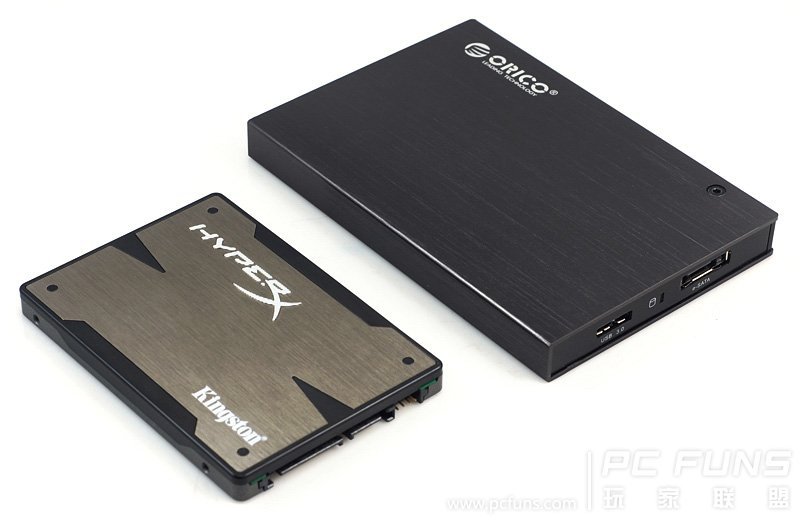
The Orico 2595SUS3 2.5-inch SATA enclosures tested by PC Funs
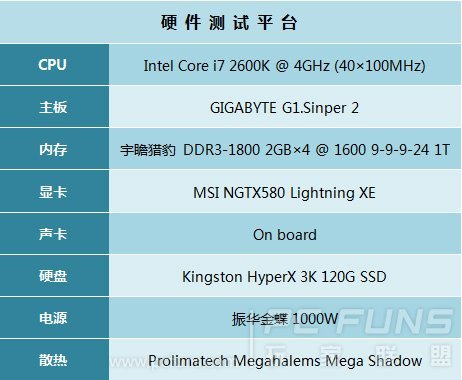
The folks at pcfuns.com ran benchmarks on the ORICO 2595 Series 2.5-inch SATA HDD/SSD external enclosures with eSATA and SuperSpeed USB 3.0 with a Kingston HyperX 3K 120 GB SSD installed.
Comparing both the SuperSpeed USB 3.0 and eSATA, they found the eSATA interface to be significantly faster, but that isn’t to say the USB 3.0 numbers were entirely unimpressive. The 2595's eSATA port averaged 200 MB/s reads and 171 MB/s writes with the Solid State Drive, while the SuperSpeed USB 3.0 port weighed in with 164.5 MB/s reads and 103 MB/s writes.
All in all, the stylish 2595SUS3 deployed with modern 2.5-inch devices provides excellent performance and is perfect for mobile applications at a price that anyone can appreciate.
ORICO 2595 Series 2.5-inch SATA HDD/SSD external enclosures with eSATA and SuperSpeed USB 3.0
Posted by
Synchrotech
at
14:10
0
comments
Labels: 2595, eSATA, orico, SATA, Solid State Drive, SSD, Synchrotech
Friday, August 23, 2013
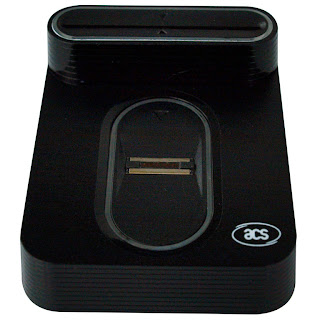
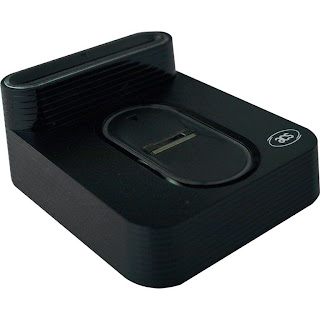
New Item: USB Full Speed PC/SC Smart Card Reader with Fingerprint Sensor AET65

Posted by
Synchrotech
at
14:15
0
comments
Labels: ACS, fingerprint reader, multi-factor authentication, security, Smart Card, USB
Wednesday, August 21, 2013
USBScope Registers and USBScope, Wave, Pulse, Count Communications Protocol Elan Documents
Many thanks to an end user for locating copies of these USBScope Registers and USBScope, Wave, Pulse, Count Communications Protocol Documents
USBScope Registers by Synchrotech
USBScope, Wave, Pulse, Count Communications Protocol by Synchrotech
We're currently phasing in Link Instruments' devices to replace the now EOL Elan ones, but there are still a lot of end users with the EOL items. To see all of the Elan and Link Instruments' we carry, see our test equipment page.
Posted by
Synchrotech
at
16:25
0
comments
Labels: ELAN, USB "Test Equipment", USB Test Equipment, USBScope50
Tuesday, August 20, 2013
Ars Technica reports: Asus is first to the party with a Thunderbolt 2-certified motherboard
Highly regarded technology site Ars Technica reported today that Asus is first to the party with a Thunderbolt 2-certified motherboard. The article's byline is "Other devices, including the new Mac Pro, will follow." Synchrotech finds this news of Thunderbolt 2 being immediately available exciting, as well as the article's announcement that USB 3.1 devices should be available in the next six months or so. Seeing both of these technologies add capabilities and increase their capacities for speed is exciting news for consumers.
Synchrotech offers several high-performance Thunderbolt devices, and intends to expand our product line up over the next few months. Thunderbolt 2's doubling of bandwidth and accommodation of single-cable 4K video represents a breakthrough for mobile users in that Thunderbolt is the only technology that allows for a single-cable connection to high end video card breakout boxes plugging into multiple 4K displays. Thunderbolt equipped notebooks are not constrained by their built in video, and Thunderbolt 2 expands upon that capability. Connecting powerful RAID and SSD to systems via Thunderbolt enables performance once only achievable by Fibre Channel and other exotic server related technologies. Current Synchrotech Thunderbolt offerings include the Delock 61971 Thunderbolt to SATA 6Gbps HDD/SSD Drive Adaptor + AC Adapter, the Sonnet Echo Thunderbolt to ExpressCard/34 Adapter Pro, and several other devices.
Thunderbolt and the Thunderbolt logo are registered trademarks of Intel.
Posted by
Synchrotech
at
11:10
0
comments
Labels: ExpressCard 2.0, Intel, SATA, Thunderbolt, Thunderbolt 2
Friday, August 2, 2013
Now in Stock: Delock 61971 Adapter Thunderbolt™ to SATA 6Gbps, wall power
The Delock 61971 Thunderbolt to SATA 6Gbps HDD/SSD Drive Adaptor represents the second generation of high-performance Thunderbolt to SATA devices. Portable, but still featuring a full 22-pin SATA connector, the 61971 Thunderbolt to SATA 6Gbps Adapter connects to both 2.5in and 3.5in SATA devices. Deploy with screaming fast Solid State Drives (SSD), or spacious Hard Disk Drives (HDD), Delock’s 61971 Thunderbolt to SATA 6Gbps HDD/SSD Drive Adaptor versatility makes it a great addition to any Thunderbolt based work flow. While best performance is achieved with SATA 6 Gb/s devices, the Delock 61971 Thunderbolt Adapter is backward compatible with SATA 1.5 Gb/s and SATA 3 Gb/s devices as well.
The 61971's 12 Volt at 2.5 Ampere power supply is used to power the adapter itself as well as connected 5.25-inch optical drives, 3.5-inch HDDs, or 2.5-inch HDDs and SSDs. The 61971 features a single Thunderbolt port and is compatible with both Mac OS X and Windows systems with Thunderbolt support. The included Windows drivers allow use with SATA based Optical Drives under Windows.
Posted by
Synchrotech
at
13:05
0
comments
Labels: Delock, HDD, SATA, SATA 6Gb/s, SATA III, SSD, Thunderbolt
Monday, July 29, 2013
HOWTO/Review: Connecting an iPhone to the M-510 Portable Bluetooth A2DP Music Receiver
The folks over at technology musings wrote an interesting HOWTO/Review on our M-510 Portable Bluetooth A2DP Music Receiver. The tutorial, replete with screen shots, explains the process for connecting iOS devices to the M-510. They also discuss some technical details of A2DP and sound quality. We've been given permission to reproduce the post here.
Connecting an iPhone to the M-510 Portable Bluetooth A2DP Music Receiver
Got a loaner M-510 Portable Bluetooth A2DP Music Receiver to test out over the weekend. We plugged it into a Bose Wave II Radio using the included double male 3.5mm stereo audio cable. Our test devices were an iPhone 3GS and an iPad with Retina display (4th generation). Both devices were running iOS 6.1.3. Getting the M-510 to work with iOS devices was a snap, and the sound quality was surprisingly good for typical mobile device playback.
The M-510 Portable Bluetooth A2DP Music Receiver supports the Bluetooth Advanced Audio Distribution Profile (A2DP) utilizing Low Complexity Subband Coding (SBC). SBC is applied to existing audio CODECs, in other words transcoding on the fly. This is fine for typical medium to higher quality AAC and MP3 stored on portable devices like iPods, iPhones, and iPads. However, if you're expecting lossless formats like FLAC, ALAC, or even high quality lossy formats like lame--preset insaneencoded files to sound the same, they won't. Highest quality audio is better served over WiFi with AirTunes/AirPlay enabled audio equipment. That said, the M-510's quality is acceptable for 256 kbps or lower quality iTunes AACs or MP3 files, which is what most people have on iDevices and other portable players. Overall the M-510 is an inexpensive way to add wireless playback ability to devices without that capability. If you're looking for really high fidelity, you're not shopping the under $40 devices market to begin with.
The M-510 Portable Bluetooth A2DP Music Receiver's other big plus is that it provides the choice between an AC adapter and running off a single AAA battery. That last option provides a lot of flexibility when you think of portable scenarios. Don't want to lug your expensive audio equipment outside, but have an old boombox with a 3.5mm line in? Add the M-510 and now that boombox becomes remote speakers for your iPhone 5.
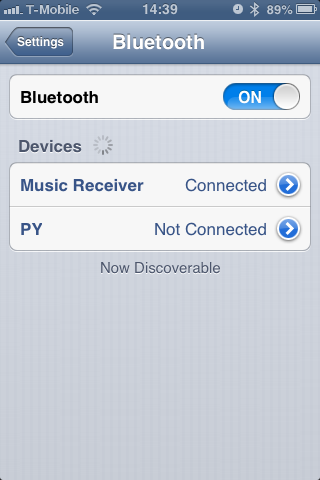
Pairing the M-510 with the iOS devices is a simple as visiting Settings > Bluetooth" and then finding Music Receiver in the list of devices
![]()
Tap on Music Receiver and it will then read as Connected.
![]()
Later if you choose to remove the saved connection by clicking arrow to the right of the word Music Receiver and then tapping Forget this Device.
![]()
During playback, clicking the AirPlay icon on the bottom right of the screen (in orange next to the volume control) allows choice of where the audio signal is to be sent.
![]()
Here the M-510 is selected. We can easily switch to the iPhone's internal speakers by clicking the iPhone button.
![]()
Posted by
Synchrotech
at
16:29
0
comments
Friday, July 26, 2013
Synchrotech one of only two vendors to debut Delock's 61971 Thunderbolt to SATA 6Gbps HDD/SSD Drive Adaptor
Because of our excellent relationship with Delock, we were selected to be one of their first vendors for their exciting new product release. The 61971 has been approved by Intel and is listed on their official Thunderbolt® site.
We are now taking pre-orders for the versatile Thunderbolt SATA device. Our tentative shipment schedule is as follows: "we will be able to ship 10 pieces to you on August 6, 2013 so you can test the product first; and other 10 pieces to ship by the end of August. After that time, we will have enough stock for this item."
The Delock 61971 Thunderbolt to SATA 6Gbps HDD/SSD Drive Adaptor represents the second generation of high-performance Thunderbolt to SATA devices. Portable, but still featuring a full 22-pin SATA connector, the 61971 Thunderbolt to SATA 6Gbps Adapter connects to both 2.5in and 3.5in SATA devices. Deploy with screaming fast Solid State Drives (SSD), or spacious Hard Disk Drives (HDD), Delock's 61971 Thunderbolt to SATA 6Gbps HDD/SSD Drive Adaptor versatility makes it a great addition to any Thunderbolt based work flow. While best performance is achieved with SATA 6 Gb/s devices, the Delock 61971 Thunderbolt Adapter is backward compatible with SATA 1.5 Gb/s, SATA 3 Gb/s devices as well.
The 61971's 12 Volt at 2.5 Ampere power supply is used to power the adapter itself as well as connected 5.25-inch optical drives, 3.5-inch HDDs, or 2.5-inch HDDs and SSDs. The 61971 features a single Thunderbolt port and is compatible with both Mac OS X and Windows systems with Thunderbolt support. The included Windows drivers allow use with SATA based Optical Drives under Windows.
Delock 61971 Thunderbolt to SATA 6Gbps HDD/SSD Drive Adaptor + AC Adapter
Posted by
Synchrotech
at
14:57
0
comments
Labels: Delock, HDD, SATA, SATA 6Gb/s, SATA III, SSD, Thunderbolt
Wednesday, July 10, 2013
Portable Bluetooth A2DP Music Receiver M-510
The Portable Bluetooth A2DP Music Receiver M-510 allows playback of streaming music on non-Bluetooth equipped devices like speakers, HiFi Systems, and headphones from a A2DP Bluetooth compatible music source. The M-510 Bluetooth Music Receiver is a great way to provide existing equipment with wire-free capabilities. Play songs from an iPad, Android or other Smart Phone, iPhone, notebook computer or any other device with A2DP Bluetooth transmitting capability to remote speakers up to 10 meters away. The Portable Bluetooth A2DP Music Receiver M-510 provides three power options, AC adapter, USB bus power, or a single AAA battery for maximum portability. Use the included cable to plug into the 3.5mm audio inputs on an output device, pair the Portable Bluetooth A2DP Music Receiver M-510 to source device, and enjoy music streamed wirelessly.
Posted by
Synchrotech
at
15:11
0
comments
Labels: A2DP, Bluetooth, Music Receiver, Portable, USB
Wednesday, June 26, 2013
Add new life to older desktop computers by providing them SuperSpeed USB 3.0 connectivity
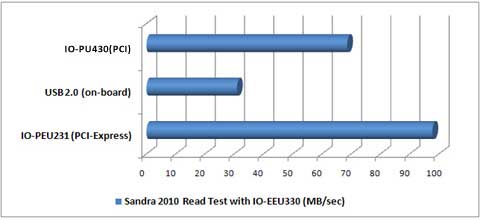
The I/O Flex PU430 PCI to SuperSpeed USB 3.0 Host Adapter 4 Port brings new life to older desktop computers by providing them SuperSpeed USB 3.0 connectivity. The PCI card adapter is fully backward compatible with existing USB 2.0 and USB 1.1 devices, and connects with SuperSpeed USB 3.0 hard drive enclosures, SSD enclosures, backup RAIDS, video converters, printers, and hundreds of other devices while enabling the use of high performance device that were once reserved only for high speed buses like eSATA and FireWire. Able to offer most of the usable bandwidth of SuperSpeed USB, the PU430 is limited to a maximum of 2.133Gbps transfer rates [1] because of the limitations of PCI. However, that's an amazing improvement over USB 2.0, and the PU430 PCI USB 3.0 solution provides over twice (200+%) the performance gain over on-board USB 2.0, and is only 30% slower than the maximum speed USB 3.0 can achieve in PCI-Express (PCIe) slots.
The adapter provides four (4) external USB 3.0 ports. The I/O Flex PU430 PCI to SuperSpeed USB 3.0 Host Adapter features both 15-pin SATA power connector and mini 4-pin power connector for added power source to better support power hungry bus-powered devices. Easy USB installation makes adding new hardware a breeze, with no complex configuration, confusing plug-ins, or IRQs. Connect up to 127 USB products to PCs. Ready for use with self-powered devices, or plug any available 15-pin SATA Power Connector into the onboard connecter for devices requiring bus power.
Benchmarks: PU430 PCI to SuperSpeed USB 3.0 Host Adapter
The I/O Flex PU430 PCI to SuperSpeed USB 3.0 Host Adapter 4 Port
The PU430 PCI USB 3.0 solution provides over twice (200+%) the performance gain over on-board USB 2.0, and is only 30% slower than the maximum speed USB 3.0 can achieve in PCI-Express (PCIe) slots
PCI to SuperSpeed USB 3.0 Host Adapter 4 Port I/O Flex PU430
Posted by
Synchrotech
at
15:36
0
comments
Labels: Adapter, PCI, SuperSpeed, USB, USB 3.0
Friday, June 21, 2013
This USB 13 Port Hub can charge an iPad or other high-current-draw device while a computer is off
This #USB 13-hub can charge an #iPad or other high-current-draw device while a computer is off http://t.co/MzQsSjc6am pic.twitter.com/PyTYBtWBbi
— Synchrotech, Inc. (@synchrotech_inc) June 21, 2013