Thursday, May 23, 2013

FireNEX COAX S800 75ohm COAX BNC FireWire 800 IEEE1394b Repeater Kit

FireNEX COAX S800 75ohm COAX BNC FireWire 800 IEEE1394b Repeater KitThe FireNEX-COAX-S800 uses flexible coaxial cabling to provide reliable FireWire 800 transmission up to 60 meters (196 feet). There are several advantages in using a standard 75 Ohm coax cable, like wide availability, excellent EMC performance, low cost connections, enabling of terminations by end users, and the possibility of using existing cabling infrastructure. Since each FireNEX-COAX-S800 repeater has two IEEE 1394b FireWire 800 ports it can also be used as a hub for daisy chain connections.

A FireNEX-COAX-S800 set includes two FireNEX COAX S800 75ohm COAX BNC FireWire 800 IEEE1394b repeaters and a manual. An available DC power jack lets you connect an optional power supply (purchased separately), such as the FIRENEX-POWER. COAX cable and FireWire/IEEE1394b cables are not included. The repeaters feature industrial standard screw locking for 1394b ports.

FireNEX COAX S800 75ohm COAX BNC FireWire 800 IEEE1394b Repeater Kit (2ct)

FireNEX800™, FireNEX-MX™, FireNEX800™-SX, FireNEX-CAT5™, FireNEX-CAT5™ S400, FireNEX-COAX-S800™, FireNEX-POF™,FireNEX-CAT5-S800™ are registered trademarks of Newnex Technology Corp. All rights reserved.

Monday, May 20, 2013

Thunderbolt Cables as long as 3 meters (9.8 feet)

FMJ USB 10-Pin Module Removable Solid-State Memory Storage Subsystem

FMJ USB 10-Pin Module Removable Solid-State Memory Storage SubsystemThe FMJ USB 10-Pin Module is a small, low cost, high performance, removable solid-state memory storage subsystem. It is an appropriate replacement for hard disk drives and host systems that require low power and small scalable storage solutions. FMJ technology is designed for customers that prefer reliable operation in harsh environments and long product life-cycle. Amongst the endless number of applications are networking products, military systems, interactive kiosks, record and playback systems, medical equipment, industrial control systems, avionics, and voting machines. Every USB 10-Pin Module is integrated with technology that prevents data corruption and loss from power anomalies. USB 10-Pin Module Pin Information.

FMJ USB 10-Pin Module Removable Solid-State Memory Storage Subsystem

OCZ Vector Series 7mm Low Profile SATA III 2.5in Solid State Drives

OCZ Vector Series 7mm Low Profile SATA III 2.5in Solid State Drives

The Vector Series delivers a new industry-leading solid state storage solution for the high-end consumer and workstation user. Meet the storage expectations you didn't know you had.

Thursday, May 16, 2013

New: Contactless Near Field Communication (NFC) PC/SC Smart Card Reader ACR122U USB 2.0

Contactless Near Field Communication (NFC) PC/SC Smart Card Reader ACR122U USB 2.0The ACR122U NFC Reader is a PC-linked contactless Smart Card reader/writer developed based on the 13.56 MHz Contactless (RFID) Technology. Compliant with the ISO/IEC18092 standard for Near Field Communication (NFC), it supports not only Mifare® and ISO 14443 A and B cards but also all four types of NFC tags. ACR122U is compliant with both CCID and PC/SC. Thus, it is a plug-and-play USB device allowing interoperability with different devices and applications. With an access speed of up to 424 kbps and a full USB speed of up to 12 Mbps, ACR122U can also read and write more quickly and efficiently. The proximity operating distance of ACR122U is up to 5 cm, depending on the type of contactless tag in use.

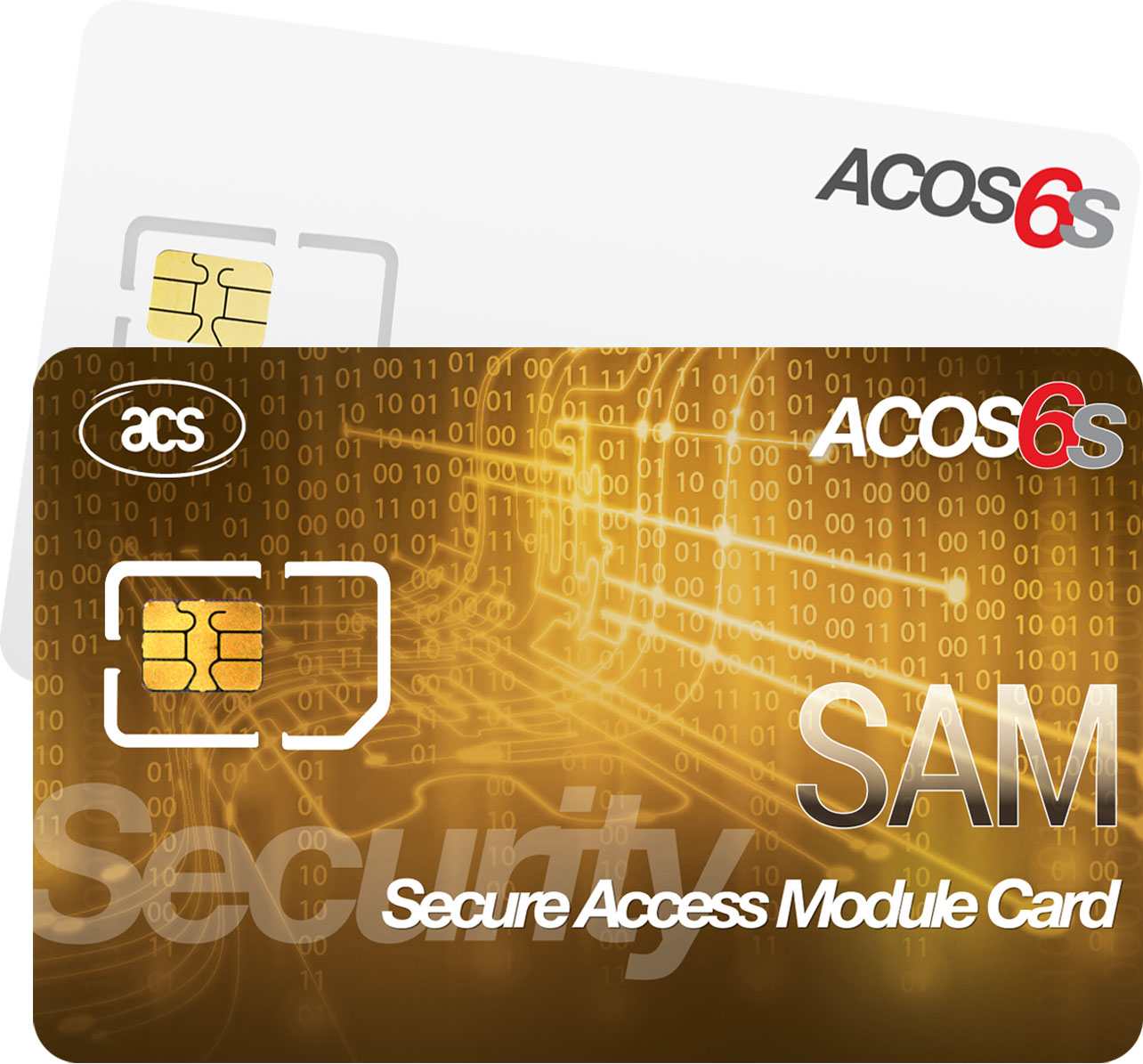
In order to increase the security level, ACR122U can be integrated with an ISO 7816-3 SAM slot. Furthermore, the ACR122U NFC Reader is available in module form, permitting easy integration into bigger machines, such as POS terminals, physical access systems and vending machines. The ACR122U NFC Reader is ideal for both secure personal identity verification and online micro-payment transactions. Other applications of the ACR122U include access control, e-payment, e-ticketing for events and mass transit, toll road fare collection and network authentication.

Contactless Near Field Communication (NFC) PC/SC Smart Card Reader ACR122U USB 2.0

Expanded and Revised: ExpressCard FAQ for ExpressCard/34 and ExpressCard/54

Table of Contents

Monday, May 6, 2013

Video: FarSite X.25 - TCP/IP - XOT products and solutions for network inter-communications

FarSite's products providing solutions for X.25 networks and communications between X.25, XOT and TCP/IP infrastructure with the expertise to assist in a smooth transition.

Wednesday, May 1, 2013

DPD200 and DPH200 DisplayPort to 2-Port Graphics Splitter Adapters

DisplayPort to 2-Port Graphics Splitter AdapterThe DisplayPort to 2-Port DisplayPort (DPD200) or HDMI (DPH200) Graphics Splitter Adapters are innovative, external multi-display adapters that allows deployment of multiple monitors from a single digital DisplayPort source. The DisplayPort Graphics Splitter is usefull for a range of applications such as gaming, graphics design or spreadsheet analysis. Uses include spanning both monitors or choosing to dedicate each monitor to a separate application. These DisplayPort graphics splitter dongles lets you combine two DisplayPort (DPD200) or HDMI (DPH200) monitors as one display, at a maximum resolution of 3840x1200, to make the ultimate wide screen desktop. This graphics expansion module can also clone your primary display and function as a 2 Port DisplayPort (DPD200) or HDMI (DPH200) Video Splitter. Compatible with DisplayPort video cards, the DisplayPort (DPD200) or HDMI (DPH200) graphics splitter dongles requires no software installation for multi-display applications, and is plug-n-play—simplifying configuration and saving time. It works with standard Microsoft Windows and Linux PCs featuring DisplayPort connectivity.

DPD200 DisplayPort to 2-Port DisplayPort Graphics Splitter Adapter DPH200 DisplayPort to 2-Port HDMI Graphics Splitter Adapter

Thursday, April 25, 2013

Video: FarSync BERT Line Tester USB/PCIe operation, installation and features

Both the PCIe and USB based BERT devices are available on our site at FarSite FarSync Bit Error Rate Test (BERT) line quality tester devices, software and cables

Demonstration in the use, installation and features of the FarSync BERT Tester. It provides a comprehensive, simple to use, all in one, line testing utility for testing asynchronous and synchronous lines from your Laptop or PC. All the popular standard BERT test patterns can be selected; the test period can be controlled; real time error counters and full line test statistics are provided as well as support for user controlled error injection.

Lines with network interfaces RS232 (V.24), V.35, RS530 (EIA530), RS422, X.21 (V.11), and RS449 can be tested with line speeds ranging from 15 baud up to 2 Mbits/s or to over 10 Mbit/s for the PCIe dual port card version.

The FarSync Flex adapter is simply plugged into any of your Laptop's USB ports or a PCIe slot; select one of the cables provided to connect to the line to be tested; the BERT application can then be started and the line quality results are displayed in real time.

API access for LabVIEW or Windows applications enables the tests to be run, and the results obtained, programmatically.

Wednesday, April 24, 2013

Orico SuperSpeed USB 3.0 W8PH4 Series Portable 4 Port Hubs

Orico SuperSpeed USB 3.0 W8PH4 Series Portable 4 Port HubsOrico's latest portable SuperSpeed USB 3.0 Hub series was designed with the latest laptops, ultrabooks, and tablet PCs in mind. Available in glossy black or white color schemes, the W8PH4 SuperSpeed USB 3.0 Hub is as attractive as it is functional. The W8PH4 4 Port Hub maximizes data transfer speeds when using higher-bandwidth peripherals including external USB 3.0 digital video cameras, disk drives, video surveillance cameras, high-resolution webcams, and multi-channel audio. These Orico hubs support USB 3.0 data transfer speeds up to 5Gb/s and provides backwards support for USB 2.0 and USB 1.1 devices. The 4 port HU430 SuperSpeed USB 3.0 Hub works with a wide range of USB devices and allows simultaneous operation of multiple USB 3.0 and legacy USB devices.

Utilizing Via's efficient VL812 USB 3.0 controller chipset with advanced USB PHY technology, the W8PH4 SuperSpeed hub features advanced power management. Its built-in integrated charging controller circuit provides Digitally Charging Port (DCP) and Charging Downstream Port (CDP) capabilities conforming to the USB Battery Charging 1.2 Specification, resulting in charging efficiency up to 3 times of ordinary USB charging port. What's more, the HU430 4 Port SuperSpeed USB 3.0 Hub provides over-current protection at each port.

Orico SuperSpeed USB 3.0 W8PH4 Series Portable 4 Port Hubs

Monday, April 22, 2013

Elan Downloads and Support Archive

We recently posted What happened to Elan Digital Systems Ltd's website? discussing the disposition of Elan. As promised, we've begun to collect files and are making them available for download. Depending on traffic, we might not keep them at these current locations, but we will update this page whenever there are any changes. Special thanks to Michael Vögele for locating the Java software for USBScope50.

CDROM ISO Images
USBT&M.iso.zip
The USB Test and Measurement CDROM image. Includes USBCount50, USBPulse100, USBScope50, and USBWave12
USBscope50_Java_CD_20091005.iso.zip
The USB Scope 50 Java Software CDROM image, the Java software was to supercede the older binaries and has the benefit of being cross-platform for Linux and The Windows
elupcr20061020.iso.zip
Drivers for P-Series cards readers CDROM image
Drivers obtained from the Wayback Machine
pseries_windows.exe.zip
Drivers for P-Series cards readers
usbcount50setup.exe.zip
Drivers for USBCount50
usbpulse100setup.exe.zip
Drivers for USBPulse100
usbscope50setup.exe.zip
Drivers for USBScope50
usbwave12setup.exe.zip

Monday, April 8, 2013

New: FarSync BERT Tester-PCIe with Bit Error Rate Test (BERT) line quality tester software + cables

FarSync BERT Tester-PCIe with Bit Error Rate Test (BERT) line quality tester software + cablesThe FarSync BERT provides a comprehensive, simple to use, all in one, line testing utility for testing synchronous lines from your PC. There are no extra expensive modules to buy to test different line types. All the popular standard BERT test patterns can be selected; the test period can be controlled; real time error counters and full line test statistics are provided as well as support for user controlled error injection.

Lines with network interfaces RS232 (V.24), V.35, RS530 (EIA530), RS422, X.21 (V.11), RS449 and RS485 (4 wire) can be tested with line speeds ranging from 100 baud up to 10 Mbits/s. The FarSync T2Ee adapter is fitted in one your PC's PCIe slots; select one of the cables provided to connect to the line to be tested; the BERT application can then be started and the line quality results are displayed in real time. There is API access for LabVIEW or Windows applications, this allows programmatic control of when tests are run, the tests to be run, and the results obtained.

FarSync BERT Tester-PCIe with Bit Error Rate Test (BERT) line quality tester software + cables

Thursday, April 4, 2013

Product updates: FarSite's FarSync Bit Error Rate Test (BERT) Testers

FarSync BERT Tester-USB Flex with Bit Error Rate Test (BERT) line quality tester software + cablesFarSite has been working to expand its Bit Error Rate Test (BERT) product line, and in accordance, there's been some changes. First, their stand-alone software package to upgrade existing FarSite Flex devices has been discontinued. Second, there's now a 2 port, 10 Mbits/s PCIe PCIe based BERT called the FarSync BERT Tester-PCIe. Lastly, the USB device that used to be called the FarSync BERT Tester, is now known as the FarSync BERT Tester-USB. In addition to adding compatibility with The Windows 8, the FarSync BERT Tester-USB adds the following new functionality.

  • API for LabVIEW and Windows Applications
  • Tests Manchester Encoding, Conditioned Di-phase
  • Correction for balanced pair signals being connected the wrong way round
  • Audible Alerts on Errors
  • RS485 4 wire support
  • Uses the FarSync Flex v2

FarSync BERT Tester-USB Flex with Bit Error Rate Test (BERT) line quality tester software + cables

FarSync BERT Tester-PCIe with Bit Error Rate Test (BERT) line quality tester software + cables

Delock Multi-in-1 SuperSpeed USB 3.0 Memory Card Reader/Writer

SuperSpeed USB 3.0 Memory Card Reader Wrapped in a compact aluminum case, Delock's All-in-One combines the capabilities of SuperSpeed USB 3.0 and matches them to a versatile memory card reader. This multi-in-1 SuperSpeed USB memory card reader/writer supports over 60 types of flash memory media cards. While broad card support is its forte, the reader is plenty fast enough to support transfer hungry memory cards like speedy UDMA 6 CompactFlash cards used in high end DLSR cameras. Utilizing SuperSpeed USB's maximum theoretical speeds of up to 5Gbps, waiting for photos and videos to transfer off cards is now a thing of the past. This SuperSpeed USB 3.0 flash memory reader also supports the massive capacities of modern storage devices, currently supporting up to 2TB on some flash media cards such as SDXC.

Delock's All-in-One doesn't trade practicality away for its high end features though. The memory card reader/writer is fully backward compatible with both USB 2.0 and USB 1.1 hosts. Its five open memory card slots can be used at the same time for data transfers and exchanges, even between cards. The reader supports Hot-Swap and Plug-N-Play, and utilizes USB bus power so no additional power source is required. The multi-platform reader is best used with systems that support SuperSpeed USB 3.0 in order to take advantage of its speed.

Deploying the MK802 Android 4.0 Mini PC Smart TV Player

MK802 Android 4.0 Mini PC Smart TV Players from SynchrotechA versatile home media and entertainment center, we found some interesting uses for the MK802 Android 4.0 Mini PC Smart TV Player. Here's a list of posts we've created:

Using the MK802 Android 4.0 Mini PC Smart TV Players on a wired network
Prefer an hardwired Ethernet connection to the MK802? Here's how to do it.
Using large USB Hard Drives with the MK802 Android 4.0 Mini PC Smart TV Player
Storage solutions for the MK802 aren't just limited to its MicroSD slot, we test out the devices' compatibility with Hard Drive Disks (HDD)
MK802 Android 4.0 Mini PC's as a potential music server
Hobbyist project for MK802 reveals ability to play back FLAC files and other tidbits
Android is a trademark of Google Inc. The Android Robot is licensed under Creative Commons.

Monday, March 25, 2013

Automating X4SD USB 2.0 SD Card Reader Four (4) Slot Operations

X4SD Operation Automation

X4SD USB 2.0 SD Card Reader Four SlotThe X4SD USB 2.0 SD Card Reader allows simultaneous access to four SD Card style media including miniSD and microSD in adapters and MultiMediaCard and its derivatives. The unit can be deployed as a card duplicator, since it presents all inserted cards simultaneously. This document is intended to provide users with ideas for deployment, but leaves the precise details of implementation up to the reader.

While it would be common for users to initiate file copies to the X4SD's individual slots manually in XFCE's Thunar, Mac OS X's Finder, or Windows' Explorer, we believe automating the process is the optimal method. To this end, we've explored a few ways to do this. First, we wrote a sample shell script that does the same thing without the benefit of visual feedback. Next, we created an example multi-threaded AppleScript that allows visual feedback of the file copies. Modifications would be required for it to be an actual production script. Last, we reproduce an article which discusses using the X4SD for creating byte-for-byte (binary images) copies of SD Cards via the Unix dd command line tool.

X4SD File Copy Shell Script

The following example shell script forks a separate process for copying to each of the X4SD's individual slots. The downsides to this script are that there is no visual feedback as to the progress of the forked processes or as to their status. We ran the top command in a separate terminal in order to watch the progress of each cp process. Removing the reader or inserted SD media before copies complete can cause a variety of problems, including corrupting the media. Forking from a shell script also has the disadvantage of not letting us see the exit results of the processes. Better parallelism and execution feedback are left as an exercise to the reader, GNU parallel and PRLL are suggested starting places. The script's ending comment provides information for converting it to sequential execution, which increases runtime significantly. The destination (target) path in this example uses Mac OS X naming conventions, see Determining Media Paths for how these mounts appear in OpenBSD and Xubuntu.

#!/bin/sh

TESTFILE="/Users/rds/Desktop/testfile680mb.m4v";

cp $TESTFILE /Volumes/NO\ NAME &
cp $TESTFILE /Volumes/NO\ NAME 1 &
cp $TESTFILE /Volumes/NO\ NAME 2 &
cp $TESTFILE /Volumes/NO\ NAME 3 &

# replace ampersands and preceding spaces with a
# semicolons for sequential execution

X4SD File Copy Multi-threaded AppleScript

Mac OS X users uncomfortable with using the built-in unix terminal do have the option of using AppleScript with the X4SD. This example takes advantage of the Mac OS X Finder's multi-thread capabilities and provides the added benefit of visual feedback of the copies and error dialogs in the case of problems. The illustration shows the simultaneous copies occurring in the foreground with a version of the script in the Script Editor in the background.

tell application "Finder"
 ignoring application responses
  duplicate "G5:testfile680mb.m4v" to "G5:Volumes:NO NAME" replacing yes
  duplicate "G5:testfile680mb.m4v" to "G5:Volumes:NO NAME 1" replacing yes
  duplicate "G5:testfile680mb.m4v" to "G5:Volumes:NO NAME 2" replacing yes
  duplicate "G5:testfile680mb.m4v" to "G5:Volumes:NO NAME 3" replacing yes
 end ignoring
end tell

X4SD Copier AppleScript

X4SD SD Card Duplication Example

The following has been reproduced with permission from Using Synchrotech's X4SD USB 2.0 SD Card Reader Four (4) Slot for SD Card duplication.

There's various ways to do do device duplication or byte-for-byte copies of media. Whether we're duplicating CD-ROMs, hard drive disks, SRAM PC Cards, or other removable media, the Unix dd is frequently preferred for these types of operations. While we can execute card to card duplications from one X4SD slot to another, the most common use for the reader is to write an existing SD Card image to all four slots simultaneously. To that end we'll create a binary image of a master SD Card and then use that master to write to blank cards.

Creating an image of the SD Card

dd works with block devices, so we need to unmount the SD Card. To make this simple, we'll be using just one of the X4SD slots at this stage. We'll be using Mac OS X for our example and detail the difference for OpenBSD and Xubuntu. First, we need to identify the mount point of the inserted card. Calling mount in the terminal shows us the information we need (we're leaving out the rest of the output here).

/dev/disk1s1 on /Volumes/NO NAME (local, nodev, nosuid)

We use that information to unmount the mounted device.

[kyoto:~/Desktop] rds% sudo diskutil unmount /Volumes/NO\ NAME
Volume /Volumes/NO NAME unmounted

OpenBSD and Xubuntu would use umount /[devicepath]. Using the block device reference to the X4SD slot, we can copy the card to a binary file using dd.

[kyoto:~/Desktop] rds% sudo dd if=/dev/disk1s1 of=sdcard.bin
1951677+0 records in
1951677+0 records out
999258624 bytes transferred in 1203.276878 secs (830448 bytes/sec)

Writing the image to SD Cards

Inserting a new card into the X4SD, then unmounting it, we can create a duplicate of the original. We then test it using cmp to see if it is identical to the binary file.

[kyoto:~/Desktop] rds% sudo dd if=sdcard.bin of=/dev/disk1s1
1951677+0 records in
1951677+0 records out
999258624 bytes transferred in 1203.276878 secs (830448 bytes/sec)
[kyoto:~/Desktop] rds% cmp /dev/disk1s1 ~/Desktop/sdcard.bin
[kyoto:~/Desktop] rds% 

Here we write to all four slots simultaneously on a Xubuntu machine. It's feasible that using hubs and multiple X4SD, we could write to more than four cards at once on a machine with enough CPUs/CPU cores. However, there's a practical limit to the amount of I/O operations one would want to run at the same time. Perhaps writing to each bank of cards sequentially would be the best practice? Since I was only provided a single test unit, that remains an academic question.

rds@okinawa-lin2:~$ sudo dd if=sdcard.bin of=/dev/sdc1 & \
&& dd if=sdcard.bin of=/dev/sdd1 & \
&& dd if=sdcard.bin of=/dev/sde1 & \
&& dd if=sdcard.bin of=/dev/sdf1 &

1951677+0 records in
1951677+0 records out
999258624 bytes (999 MB) copied, 270.799 s, 3.7 MB/s
1951677+0 records in
1951677+0 records out
999258624 bytes (999 MB) copied, 423.987 s, 2.4 MB/s
1951677+0 records in
1951677+0 records out
999258624 bytes (999 MB) copied, 775.1 s, 1.3 MB/s
1951677+0 records in
1951677+0 records out
999258624 bytes (999 MB) copied, 860.479 s, 1.2 MB/s

Appendices

Determining Media Paths

Here's the abridged results of running mount on our various test systems with the X4SD plugged in and all four of its slot occupied. This output will look different based on what's connected to an individual system.

OpenBSD
sd0i on /mnt/s1 type msdos (local)
sd1i on /mnt/s2 type msdos (local)
sd2i on /mnt/s3 type msdos (local)
sd3i on /mnt/s4 type msdos (local)

Xubuntu Linux
/dev/sdd1 on /media/BF2C-1214 type vfat (rw,nosuid,nodev,uid=1000,gid=1000,shortname=mixed,dmask=0077,utf8=1,showexec,flush,uhelper=udisks)
/dev/sdf1 on /media/02A3-1214 type vfat (rw,nosuid,nodev,uid=1000,gid=1000,shortname=mixed,dmask=0077,utf8=1,showexec,flush,uhelper=udisks)
/dev/sde1 on /media/3A3A-1214 type vfat (rw,nosuid,nodev,uid=1000,gid=1000,shortname=mixed,dmask=0077,utf8=1,showexec,flush,uhelper=udisks)
/dev/sdc1 on /media/5AED-1214 type vfat (rw,nosuid,nodev,uid=1000,gid=1000,shortname=mixed,dmask=0077,utf8=1,showexec,flush,uhelper=udisks)

Mac OS X
/dev/disk2s1 on /Volumes/NO NAME 3 (local, nodev, nosuid)
/dev/disk4s1 on /Volumes/NO NAME 2 (local, nodev, nosuid)
/dev/disk3s1 on /Volumes/NO NAME (local, nodev, nosuid)
/dev/disk1s1 on /Volumes/NO NAME 1 (local, nodev, nosuid)

Our Test Systems

Here's the results of running uname -a on our various test systems.

OpenBSD okinawa-bsd2.my.domain 5.1 GENERIC.MP#207 amd64
Linux okinawa-lin2 3.2.0-39-generic #62-Ubuntu SMP Wed Feb 27 22:05:17 UTC 2013 i686 i686 i386 GNU/Linux
Darwin kyoto 8.11.0 Darwin Kernel Version 8.11.0: Wed Oct 10 18:26:00 PDT 2007; root:xnu-792.24.17~1/RELEASE_PPC Power Macintosh powerpc

Code example disclaimer

Synchrotech grants you a nonexclusive copyright license to use all programming code examples from which you can generate similar function tailored to your own specific needs.

All sample code is provided by Synchrotech for illustrative purposes only. These examples have not been thoroughly tested under all conditions. Synchrotech, therefore, cannot guarantee or imply reliability, serviceability, or function of these programs.

All programs contained herein are provided to you "AS IS" without any warranties of any kind. The implied warranties of non-infringement, merchantability and fitness for a particular purpose are expressly disclaimed.

Thursday, March 7, 2013

What happened to Elan Digital Systems Ltd's website?

ElanRoughly a year or so ago, British firm Elan Digital Systems Ltd went into liquidation. We, like many others, expected their assets to be purchased by another firm, or at the very least, for their liquidator to make some announcement of the disposition of their assets.

Unfortunately, that never happened, and around December of 2012, Elan's website went dark. Had we know this was going to happen, we would have archived the contents of their site. This leave countless Elan customers in a bind, with no access to support, troubleshooting, or download pages. From our standpoint, customers deserve access to these items for the foreseeable future.

Fortunately, the Internet Archives Wayback Machine archived the Elan site on November 5, 2012. Unfortunately, their are some binaries that aren't archived. Over the next few months, we will download and archive all the binaries and important support documents we can. We will also go through out remaining stock of Elan items and make ISO image copies of install CDROMS for items that aren't available on the website. Check back here for updates on this project.

Furthermore, we wrote to Elan's liquidator requesting the files for Elan's defunct website. Having the original files from their server would speed up the archival process. For customers interested in contacting the liquidator directly, we will provide the information below. Perhaps if enough customers write them, they will be disposed to helping out with this important project.

Elan liquidator:

James Richard Tickell and Carl Derek Faulds of Portland Business & Financial Solutions Limited, 1640 Parkway, Solent Business Park, Whiteley, Fareham, Hampshire, PO15 7AH

Friday, February 22, 2013

New and improved: USB 2.0 Hub 12+1 Port with 2.1A iCharge Port Powered with Power Supply

USB 2.0 Hub 12+1 Port with 2.1A iCharge Port Powered with Power SupplyTired of wrangling multiple USB 2.0 hubs? Synchrotech's 12+1 Port USB 2.0 Hub with 2.1A iCharge Port provides host computers with 12+1 additional USB ports and allows flexible tiered USB configurations with a single hub! This robust and inexpensive hub runs in self powered mode and provides over current protection at each of its downstream ports. Fully USB 2.0 compliant and USB 1.1 backward compatible, it supports low, full, and high speed USB devices and works with any system that supports the USB specification. Providing thirteen downstream ports, this hub features plug and play installation and transparent operation. This hub is fully backward compatible with USB 1.1 and will work with systems and devices using the slower standard. It comes with a free power supply with a generous 4 ampere capacity, and USB 2.0 cable to connect to a host computer.

The new model of this hub trades one data port for a high-current capacity 'iCharge" port for devices requiring 2.1 Amperes to charge, like the iPad®. The charging port is not a data port and does not allow syncing or any other functionality other than device charging. However, this lack of data transfer on the iCharge port does have a distinct advantage—the hub doesn't need to be connected to a computer in order to charge a device. The other 12 ports allow for syncing and other standard USB 2.0 operations for connected devices.

Thursday, September 6, 2012

Using large USB Hard Drives with the MK802 Android 4.0 Mini PC Smart TV Player

MK802 Android 4.0 Mini PC Smart TV Players from SynchrotechBecause of its abilities as a home media and entertainment center, we wanted to make sure the MK802 Android 4.0 Mini PC Smart TV Player was able to work with USB 2.0 Hard Drive Disks (HDD) in addition to portable USB 2.0 Flash Drives mentioned in its marketing materials.

We plugged a 340GB USB 2.0 HDD into the MK802 Android 4.0 Mini PC Smart TV Player's USB port and the entire drive was accessible, and we were able to play various media files off the drive. This means large media libraries can be deployed without concerns about the relatively limited capacities of USB Flash Drives. We don't know if there's a capacity ceiling for USB HDDs used with the MK802, but we will continue to test various USB 2.0 Hard Drives with the device as time permits and post any results here.

Delock FireWire 800 to UDMA CompactFlash Drive Read-Writer

Delock FireWire 800 to UDMA CompactFlash Drive Read-WriterSynchrotech's Delock FireWire 800 to UDMA CompactFlash Drive Read-Writer is a must for pro photographers and other demanding users of high speed CompactFlash memory cards. Capable of exploiting the high speeds of the latest generation of CompactFlash memory cards, the FireWire readers 800 boasts incredible read speeds. The Delock FireWire 800 to UDMA CompactFlash Drive reader supports all the recent high-speed CompactFlash standards including PIO Modes 0-4, DMA Modes 0-2, and UDMA Modes 0-6. it features a single CompactFlash slot for CompactFlash Type I and II including Hitachi Microdrives and other CFII+ rotating media. It supports FireWire 800 (and 400 with and optionally purchased adapter or cable) connectivity on both Macintosh and Windows Operating Systems. The FireWire 800 to CompactFlash uses FireWire bus power, so the CFFire800 reader plugs and plays with no external AC power. The Delock FireWire 800 to CompactFlash Drive requires no drivers and comes with a one year limited warranty.

Check out UDMA CompactFlash Reader Benchmarks over Various Bus Connections for benchmarks using the Delock FireWire 800 to UDMA CompactFlash Drive Read-Writer.

Monday, July 30, 2012

Hot August Special on the OCZ 240GB Vertex 3 SATA III SSD

OCZ-VTX3-25SAT3-240G OCZ Vertex 3 Series SATA III 2.5 Hot August Special: $20 off the OCZ Vertex 3 Series SATA III 2.5" Solid State Drive 240GB model using coupon 1343683571, exclusive of other offers, expires 08/31/2012. This brings our already low price on this model to only $295! OCZ Vertex 3 Series SATA III 2.5" Solid State Drives

Monday, June 25, 2012

Using the MK802 Android 4.0 Mini PC Smart TV Players on a wired network

MK802 Android 4.0 Mini PC Smart TV Players from SynchrotechThe MK802 Android 4.0 Mini PC Smart TV Player has built-in WiFi 802.1b/g/n Wireless networking, but what if you only have a wired network? Well, the good news is that The MK802 works with many USB based Ethernet Adapters. We've tested our USB 2.0 to 10/100Base-TX RJ-45 Ethernet Adapter U-250 with the MK802 Mini PC, and it worked like a charm.

USB 2.0 to 10/100Base-TX RJ-45 Ethernet Adapter U-250You do need to change some Settings in order to get the MK802 Android 4.0 Mini PC Smart TV Player up and running on a wired Ethernet network, but it's a straightforward process. Once it's up and running, the MK802 takes full advantage of being on a wired connection.

The MK802 screen to set up Ethernet looks much like this.

Monday, April 30, 2012

Updated Sony Driver Transforms Sonnet's Echo ExpressCard Adapter Fastest and Least Expensive SxS Memory Card Reader with Thunderbolt Technology

Sonnet Echo Thunderbolt to ExpressCard/34 AdapterSonnet Technologies announced on April 16, 2012 that the Echo™ ExpressCard® Thunderbolt™ Adapter, which enables the use of many Sonnet ExpressCard/34 cards with computers equipped with a Thunderbolt port—including the latest Apple® iMac®, Mac® mini, MacBook Air®, and MacBook® Pro models—can now function as an SxS™ memory card reader. Sonnet supported Sony® in its work to create a Thunderbolt technology-compatible Mac OS® X driver to enable this functionality. This updated driver also enables full functionality of Sonnet’s Qio™ E3 professional SxS media reader, when connected through the Echo adapter to a computer with a Thunderbolt port.

High-performance SxS memory cards are used in Sony’s popular XDCAM® EX™ line of professional HD camcorders and the ARRI® ALEXA line of digital cameras, and share the same form factor and connector as ExpressCard/34 adapter cards. These shared traits make ingesting footage from SxS media a quick, simple task in ExpressCard slot-equipped notebook computers. In any other situation, this process requires the use of a specialized media reader, such as Sonnet’s Qio™ pro media readers with multiple SxS slots for speedy file offloads. With the added capability to read SxS, SxS Pro™, and SxS-1™ cards, the Echo ExpressCard Thunderbolt Adapter instantly becomes the least expensive high-speed SxS memory card reader available, enabling Thunderbolt technology-equipped Mac computers to read SxS cards at over 100 MB/s.

When used with the Echo ExpressCard Thunderbolt Adapter, users can connect Sonnet’s Qio E3 professional SxS media reader, with its ExpressCard/34 interface card, to compatible computers with a Thunderbolt port. This setup supports concurrent data transfers from SxS memory cards in all three slots for even faster file ingest speeds.

“With the installation of Sony’s Thunderbolt technology-compatible driver for Mac OS X, Echo ExpressCard Thunderbolt Adapter users gain the ability to ingest footage through a small, rugged adapter using the latest I/O technology to improve workflow speeds significantly,” said Robert Farnsworth, CEO of Sonnet Technologies. “This new driver benefits users of our Qio E3 professional media reader, enabling them to connect their readers to Thunderbolt technology-equipped computers through the Echo ExpressCard adapter and ingest footage from multiple SxS memory cards at the same time.”

Developed by Intel® and brought to market with technical collaboration from Apple, Thunderbolt technology supports high-performance data services and high-resolution displays through a single compact port. The Echo ExpressCard Thunderbolt Adapter supports PCI Express technology with 2.5 Gbps throughput in both directions. The Sonnet adapter connects directly to a computer or at the end of a Thunderbolt device chain with a Thunderbolt cable, which is available at the Apple Store®.

“Thunderbolt delivers unparalleled performance, flexibility and simplicity to personal computing.” said Jason Ziller, Intel’s director of Thunderbolt marketing. “The Sonnet Echo ExpressCard Thunderbolt Adapter and Qio E3 help highlight what Thunderbolt technology makes possible.”

The Echo ExpressCard Thunderbolt Adapter—part number ECHO-E34—is compatible with all Apple computers running Mac OS X that are equipped with Thunderbolt ports. It is available now at a suggested retail price of $149.95 through Sonnet and Sonnet resellers.

A link to the driver is below. It says nothing about the Thunderbolt compatibility on the downloads page. As of this morning, the actual version of the driver that gets downloaded is 1.1.0.03142 (even though the text on Sony's site says "Latest Version for Mac : Ver:1.0.52020") http://pro.sony.com/bbsc/ssr/cat-recmedia/resource.downloads.bbsccms-assets-mkt-recmedia-downloads-upgrades.shtml

Wednesday, March 28, 2012

About The Memory Card Explorer (MCE) Demo And MCE In General

MCE 3.21 was the final revision of the software, released in January of 2005.

Elan Digital Systems Ltd. was placed into liquidation in late 2011, and is no longer manufacturing any products or updating any software. This means, to all intents and purposes, MCE is an End Of Life product (discontinued).

We have some excellent alternatives, including a stand alone software package and portable PC Card readers with that software bundled. We strongly recommend all our customers consider those options since they are current and maintained products that run under modern versions of The Windows, whereas MCE's compatibility ended with the 32-bit version of Windows XP.

The product line we recommend is from CSM/IPI and you can view the whole range of their products, including USB 2.0 based PC Card Drive/software bundles on this page:

PCMCIA PC Card Manager Software for OMNIDrives and SoftDrive Professional

OmniDrive devices and their related software work with all modern Windows installations, including the 64-bit version of Windows 7. PC Card Manager and SoftDrive Professional offer all the same capabilities of MCE including the ability to erase, checksum, query, copy to and from, and create byte-for-byte binary images of PCMCIA PC Card memory devices.

All that said, there are still installations of Windows XP and older that will run MCE. In some cases, customers have a reason for running the software and or this demo version -- frequently to identify an unknown PC Card -- so we will carry MCE until our supplies are exhausted.

CAVEAT EMPTOR

MCE and MCE demo are End Of Life products with no upgrade path and no update potential. Moreover they are unsupported products. We will not provide any support on them at all and can't guarantee that the FAQs and support documents on Elan's website will be available in the long term. Install the demo or purchase MCE at your own risk. Again, we recommend all customers purchase the CSM/IPI products discussed above in lieu of MCE.

Because MCE is an End Of Life Product, Synchrotech is offering a massive 50% discount discount on the retail price.

Memory Card Explorer