MicroU2E Issues Thread
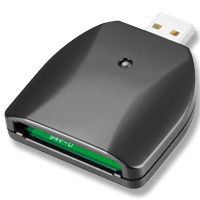 This thread is for discussing issues with the MicroU2E. Issues include, but aren't limited to: unsupported systems, incompatible ExpressCards, experiences, etc.

This support blog is for new product announcements and online technical support for our customers.
This thread is for discussing issues with the MicroU2E. Issues include, but aren't limited to: unsupported systems, incompatible ExpressCards, experiences, etc.


22 comments:
We notice Synchrotech is now offering an extention cable for this device.
CAB-USB2-AAFA-0020C USB 2.0 A + A (Power only) to A (Female) 'Y' Extender Cable 19cm/.62F for the MicroU2E
http://synchrotech.blogspot.com/2007/12/specialized-optional-y-extender-cables.html
Would like to know if this will work with a Pantech PX-500 card?
> Would like to know if this will work with a Pantech PX-500 card?
Since the Pantech PX500 is a PC Card, and the MicroU2E only supports USB based ExpressCards, the answer is:
NO, it does NOT work with the Pantech PX500.
will this work with the SxS cards from sony which the pmw ex1 uses ?
> will this work with the SxS cards from sony which the pmw ex1 uses?
No. SxS cards are PCIe based. The MicroU2E only supports USB based ExpressCards. For devices that may be able to support SxS cards, please see:
PCI Express to ExpressCard Slot Drives
will this work with a Sierra Wiresless 880E?
and if this is all i will use do i need the
MicroU2E-MV
or is the
MicroU2E enough for this card
We checked Sierra Wireless' data sheet for this device:
http://www.sierrawireless.com/resources/product/AirCard_880E_881E_ExpressCard_Datasheet_Generic_rev_1.1.pdf
It has no information for the required voltages. We would recommend the MicroU2E to be safe. If you contact Sierra Wireless and find out the 880E is 3.3V only, then you can go with the original MicroU2E.
I have 2 laptops; one with an ExpressCard 34 slot and the other with a PC Card slot. I want to use my Option Wireless GT Ultra Express LaptopConnect Card-3G (At&t) with the laptop with the PC Card slot to connect to the internet. Which product (adapter) would you recommend using? The ExpressCard 34 to PCMCIA PC Card and CardBus Read-Writer DuelAdapter 1 Slot OR the MicroU2E USB 2.0 to USB 2.0 Mode ExpressCard 34|54 Host Adapter? Thank you in advance for your help!
We were a little confused by your question, but will try to clarify. You want to use an ExpressCard with a PC Card equipped notebook computer? Then the product you want is the ExpressAdapt, which allows use of ExpressCards in 32-bit PC CardBus slots.
ExpressAdapt PC CardBus to USB Mode ExpressCard Adapter
http://www.synchrotech.com/products-expc/pcmcia-pc_cardbus-usb-expresscard-adapter-expressadapt.html
Thank you for your response above, it was helpful.
I'm not a techie so bare with me.
My brother got a good deal on a secondary laptop and he loves it. However, it doesn't have a slot for his Verizon Wireless V740 ExpressCard.
I would like to buy him something that would allow it to connect to the new laptop. The new laptop only have USB ports and it runs Windows Vista Home Basic.
If I purchased this product from your site: USB-EXP-ADP-01 MicroU2E USB 2.0 to USB 2.0 Mode ExpressCard 34|54 Host Adapter would it allow him to connect his Verizon V740 Expresscard to the new PC via the USB port and access the internet with it?
Would I need to purchase anything else for it to work?
Does it come with good instructions on how to make it work? He is not a techie either, usually looks to me to help out with these things, LOL how funny is that! LOL. So the closer to it being plug and play the better.
Any help would be appreciated, thanks!
The Novatel Wireless Merlin V740 offered by Verizon is listed on the compatibility chart for the MicroU2E
http://www.synchrotech.com/support/tech-notes-01.html#compat-usb-exp
You don't need any other items unless you want to extend it from the port or need additional power for low reception areas. In those cases we offer the AirQueue and DoubleQueue cables available on the same page as MicroU2E.
The device comes with no instructions. When correctly plugged in, it will behave exactly as if the V740 was in an ExpressCard slot. In other words, you should follow the instructions provided by your wireless carrier (Verizon in your case).
I just wanted to thank you again with helping me select this device. My brother absolutely loved it as a Christmas present, he was so happy to be able to use his work wireless card on his new laptop. It will save him $60 a month over two years (the cost here to get a subscription for a new USB wireless card). The device worked as promised and he had no connection or response time problems at all. Thank you! Its nice to see an honest, customer service oriented company on the internet. I will definitely order other products in the future.
Will the MicroU2E-MV USB 2.0 to USB Mode ExpressCard 34|54 Multi-Voltage Host Adapter work with the Sandisk SDP3Bi-128 PCMCIA card?
Bert asks: Will the MicroU2E-MV USB 2.0 to USB Mode ExpressCard 34|54 Multi-Voltage Host Adapter work with the Sandisk SDP3Bi-128 PCMCIA card?
Couple of things, first there's no such thing as a PCMCIA Card. The Sandisk device you refer to is a PCMCIA PC Card, more appropriately an ATA Flash PC Card. Second, the MicroU2E family works with ExpressCards, not PC Cards. For a list of devices that would work with your Sandisk SDP3Bi-128, see:
Card Readers for PCMCIA ATA Flash PC Card Memory
http://www.synchrotech.com/products/ata-flash-pcmcia-memory-pc_cards_00.html#ata-readers
Will this work with a Novatel PC770 Mobile Broadband Data Card? I have this card for my corp laptop and want to use it with my new macbook. But the new macbook has no expresscard slot.
thanks!
We have no reason to believe it wouldn't work with the Novatel Wireless PC770 device, although that specific device hasn't been tested.
i want to ask about...
MicroU2E-MV USB 2.0 to USB Mode ExpressCard 34|54 Multi-Voltage Host Adapter
is this MicroU2E-MV will work with Creative Sound Blaster X-Fi Xtreme Audio Notebook (ExpressCard 54mm)?
cause i really need a converter to use in USB base
thanks
@therry_ping@yahoo.com ask Creative if their ExpressCard is PCIe based or USB based. If it's the former, then no it won't. If the latter, then yes the MicroU2E should work with it.
Hello, can this adapter be used with dual PCI 32 to ExpressCard adapted/riser card? I'm planning to use PCI soundcards on the riser. Thanks in advance!
@pisces Sorry, the device does not support PCI or PCIe devices. It would not work for your application.
Post a Comment